Capture the details behind each milk entry.
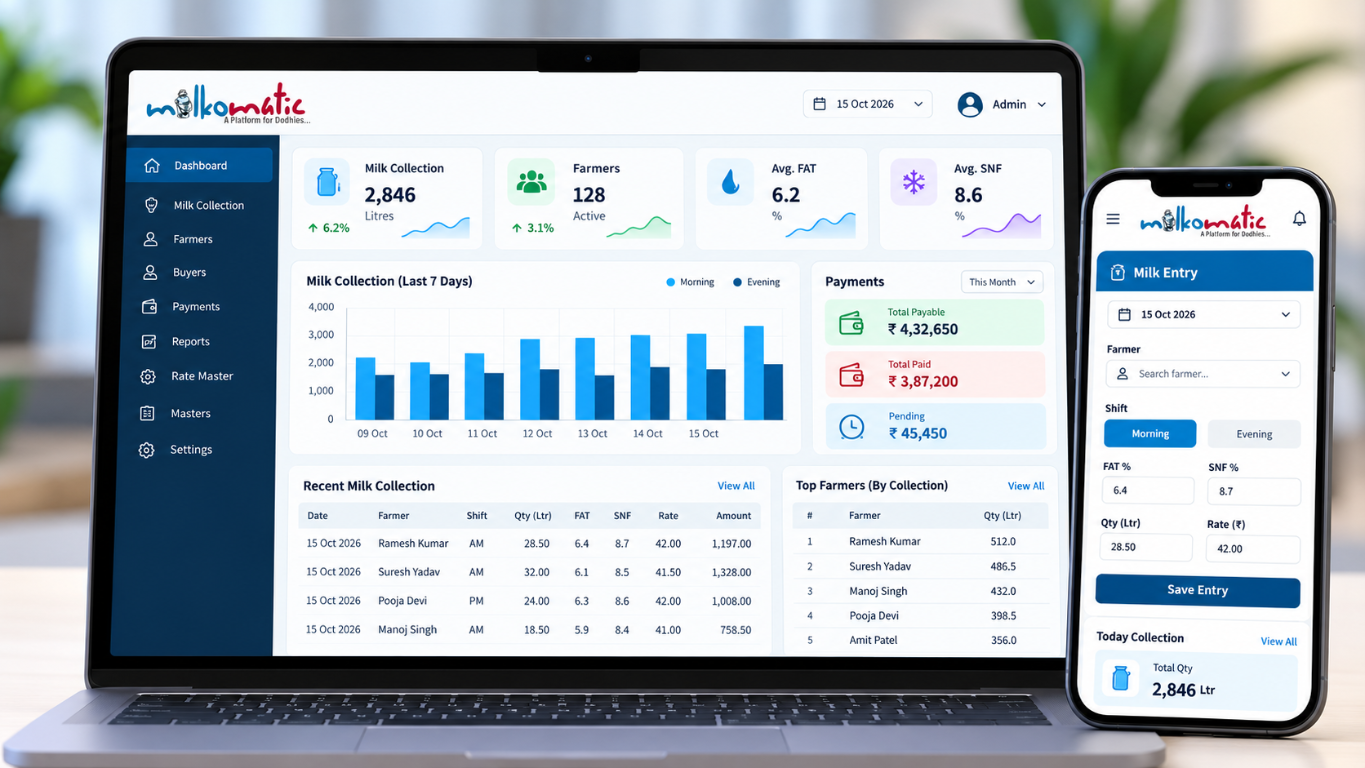
Record a morning or evening entry with its milk type, quantity, FAT, SNF, configured rate and amount.
- Shift
- Milk type
- Quantity
- FAT / SNF
- Rate
- Amount
KSS flagship Dairy management software
Manage milk collection, members, rates, billing, payments and day-to-day dairy operations through one connected system.
What Milkomatic helps manage
Start with the milk record, then follow the member, rates and account activity around it.
Record a morning or evening entry with its milk type, quantity, FAT, SNF, configured rate and amount.
Keep collection entries connected to member records, buyer relationships and route information.
Use configured rate lists with milk type and quality values as part of the dairy’s rate workflow.
Bring milk billing together with payment and receipt voucher activity.
Review daily transactions and account activity in the relevant records.
Review milk collection, route and other day-to-day dairy activity.
A connected dairy workflow
Each step builds on the records your dairy has configured.
Record the shift and quantity.
Capture quality values with the entry.
Apply the relevant dairy rate setup.
Keep the record with its member.
Bring entries into billing.
Review voucher and account activity.
Review collection and operations.
Rate calculation and billing follow the dairy’s configured setup; this overview does not assume one fixed process.
Rates & quality
Milkomatic supports configured rate lists for Cow and Buffalo milk, with FAT and SNF values represented in milk records and rate workflows. Member records can be associated with rate lists, and market-rate options are available where configured.
The page describes rate capabilities without publishing internal calculation formulas.
Beyond the collection entry
Connect member records with routes and buyer accounts, including union or samiti types where used.
Assign rate lists to members and update multiple member assignments together when operational needs change.
Member access can include collection, payment and receipt activity, and ledger details when the portal is enabled.
Platform experience
Choose a currently configured destination. The dashboard and mobile milk-entry visual above shows the product across screen sizes.
Explore the Milkomatic websiteOpen the configured web application.
Open Milkomatic AppFollow the published Google Play destination.
Get it on Google PlayFor dairy teams managing milk collection
Tell us about your collection process, rate setup, billing needs and day-to-day requirements. We can discuss current capabilities and answer your questions.
A demo request starts a conversation; it does not create a booking, activate a trial or unlock an installer.